How to plan Christmas gifts and a budget for everyone
By Jay Stants, who builds GiftLoom. Updated Nov 1, 2026
The short answer
- List everyone you buy for.
- Set one budget, then split it by person.
- Write ideas down the minute you have them.
- Track each gift from idea to wrapped.
- Put a date on anything that ships.
- Keep your partner’s gifts where they cannot see them.
The steps
List everyone you buy for
Write down every person before you think about a single gift: family, your partner, teachers, the friend you swap with every year, the work Secret Santa. You cannot set a budget for a list you have not seen, and the people you forget are the ones who get a rushed gift on December 23.
In GiftLoom: Add each person once under People, with their sizes and notes. They stay there after Christmas, so next year the list is already made.
Set one budget, then split it by person
Pick one number for the whole season first: what you can pay in full by January. Then give each person a share of it. Deciding per person before you shop is what stops the last few people on the list getting whatever is left.
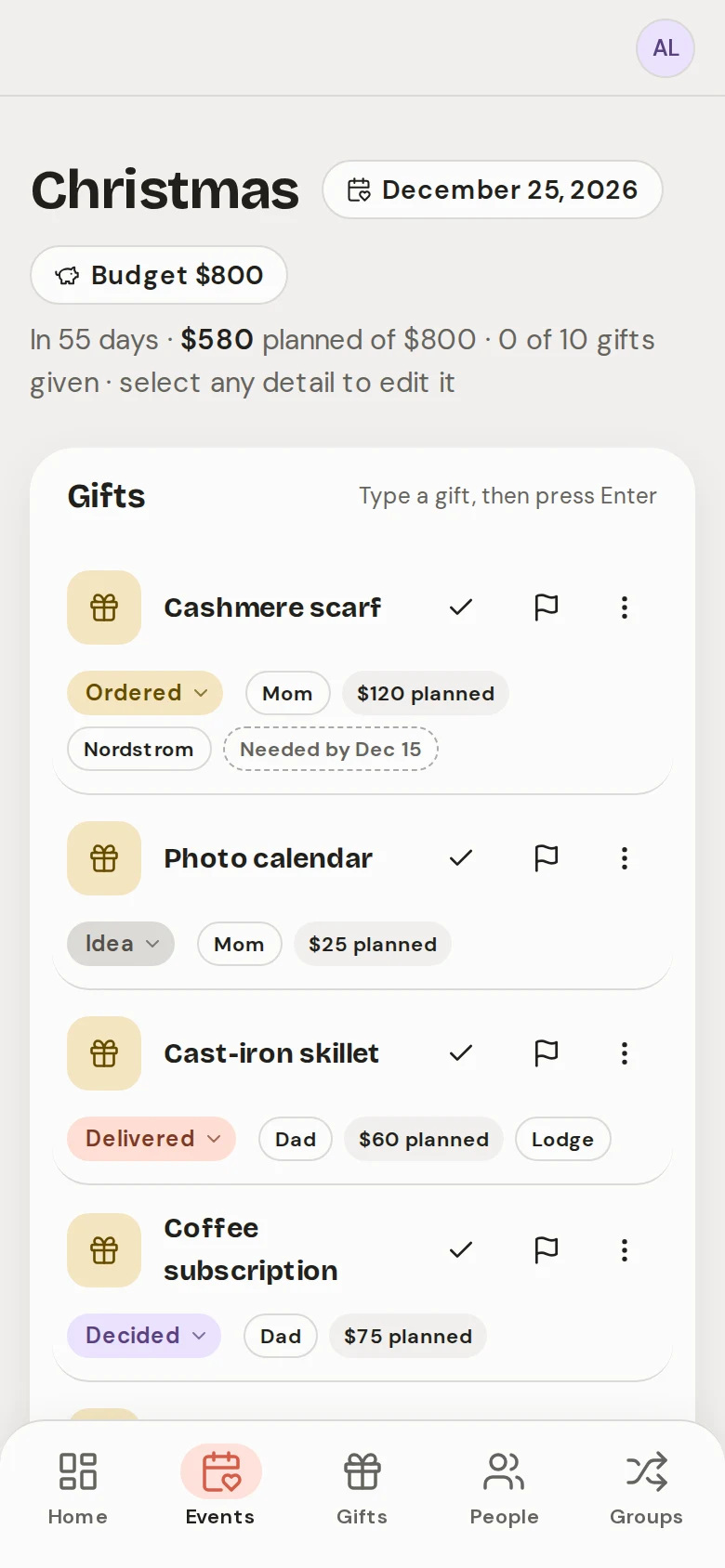
In GiftLoom: Give the Christmas event a budget, and each person a budget of their own. The event page shows what you have planned against the event budget, and past events keep what you spent.
Write ideas down the minute you have them
The best ideas turn up in passing: a comment at dinner, a link someone sends in October. Write each one down that minute, next to the person’s name and the price. An idea you meant to remember is gone by the time you shop.
In GiftLoom: Type one line, like “Scarf for Mom #Christmas $120”, and GiftLoom files it under the person, the event and the price. Paste a store link and it keeps the store too.
Track each gift from idea to wrapped
Give every gift a status: idea, ordered, arrived, wrapped. In a spreadsheet that is one column; on paper it is a tick. The point is to see at a glance what is still unbought while there is time to buy it.
In GiftLoom: Every gift moves from Idea through Decided, Ordered, Delivered and Wrapped to Given, and the event page shows what is still left to buy.
Put a date on anything that ships
Check the last day each store you use promises Christmas delivery, and set your own date a few days before it. Anything ordered after that is a gamble, so buy those gifts in a shop.
In GiftLoom: Give a gift a needed-by date and GiftLoom nudges you by email when it is close. The Christmas event gets its own reminder email a week before, or on the days you pick.
Keep your partner’s gifts where they cannot see them
If you plan with a partner, a shared spreadsheet or note shows them the gifts you are getting them. Keep their gifts on a list of your own.
In GiftLoom: Invite your partner to the Christmas event and link them to their own name. The gifts you plan for them stay hidden from them, and the gifts they plan for you stay hidden from you.
What it looks like in GiftLoom
New households join a few each week. Join the waitlist for a place.
Join the waitlistQuestions
When is a spreadsheet enough for Christmas gifts?
If you buy for five or six people, only at Christmas, and plan on your own, a spreadsheet is enough. You already know how to use one, and a column of prices totals itself.
It starts to strain when you plan birthdays too, shop from your phone, or share it with someone you are buying for. It never reminds you, and a shared sheet shows them their own gifts.
The columns to start with:
- Person
- Gift idea
- Budget
- Price
- Status
- Order by
- Link
How much should I budget for Christmas gifts?
Start from what you can pay in full by January, not from what you spent last year. Split that by person, and keep a little back for the gifts you forget and the ones that cost more than the tag.
When should I start planning Christmas gifts?
Early November is a good time to write the list and set the budget. It leaves room for anything that has to ship, and for spreading the spending over more than one paycheck.
Is there a Christmas gift list app for Android and iPhone?
GiftLoom runs in the browser on any phone or computer, so it works on Android and iPhone alike, with nothing to install. There is no app store app yet.
What does GiftLoom not do yet?
There is no app store app, and no email when you go over a budget; the event page shows it instead. The trial is free with no card, and the price after it is not set. New households join from the waitlist, a few each week.
Who builds GiftLoom, and what happens to my data?
- One developer, Jay Stants. A free trial; new households join a few each week.
- Live today: the capture line; reminder emails (a week before by default, or on days you pick); needed-by nudges; shared events and wishlist claims; per-event and per-person budgets.
- Your data: export your data as a JSON file, or delete your account, from Settings.
- Corrections to support@giftloom.app.
Join the waitlist
New households join a few each week. Join the waitlist and I send you a sign-up link when there is a place; the trial is free with no card. You can export your data or delete your account from Settings at any time.